Your installed base is scattered across spreadsheets, invoices and inboxes. Standing it up shouldn't take a data project.
You've placed devices for years — hundreds, maybe thousands of them. The record of every one exists somewhere. That's the problem: somewhere. It's an ERP export with cryptic column names, three technicians' private spreadsheets, a decade of service-invoice PDFs, a folder of warranty scans, and the tribal memory of one person who happens to be on holiday next week. Every system you've ever evaluated hit the same wall before it could do anything useful: first, someone has to get all of that in. And that someone is usually your best person, for weeks.
This is the real reason installed-base initiatives stall. Not the software — the data-entry tax at the front of it. Your installed base is the single most valuable asset you own: every device you've placed is a future preventive-maintenance contract, a consumables stream, an upgrade conversation. But you can't work an installed base you haven't stood up, and standing it up by hand is painful enough that it keeps getting deferred. First value slides from week two to week eight to "let's revisit next quarter."
So what if you didn't do the import at all? What if you just handed over what you already have — the spreadsheets exactly as they are, messy columns and blank cells and all, the invoice PDFs, the raw ERP dump — and the system read them the way a careful person would, and built a clean installed base out of the mess?
"Here's everything we have on our devices. Turn it into our installed base."
That's the shift. Not a migration project with a template you have to conform to first. A conversation, where you bring the material you already have and get back a structured, working installed base.
How it actually works
It reads sources that don't match each other. A spreadsheet whose columns are named whatever the last person felt like naming them, a scanned service invoice, an ERP export — and it works out for itself which field is the device model, which is the serial number, which is the customer site, the install date, the PM interval. There's no rigid template you have to fill in before it will start.
Then it does the part that saves the weeks: it matches and merges. The same ultrasound unit that shows up in a 2019 sales record, a 2022 service invoice and a technician's spreadsheet becomes one device with one continuous history — not three duplicates you'd have to reconcile by hand later.
And it is deliberately deterministic and real-data-only. It never invents a serial number to fill a blank. If the source doesn't say, the field stays empty and gets flagged for a person to confirm — and every record traces back to the exact document it came from. Instead of a silent black-box import you have to take on faith, you get a review: what it's confident about, what it merged, and the short list of genuine ambiguities that actually need a human decision. You're checking its work, not doing the work.
Show it
This isn't a mock-up. Here's the system doing exactly that on a real installed base — watch it run, then see the receipts:
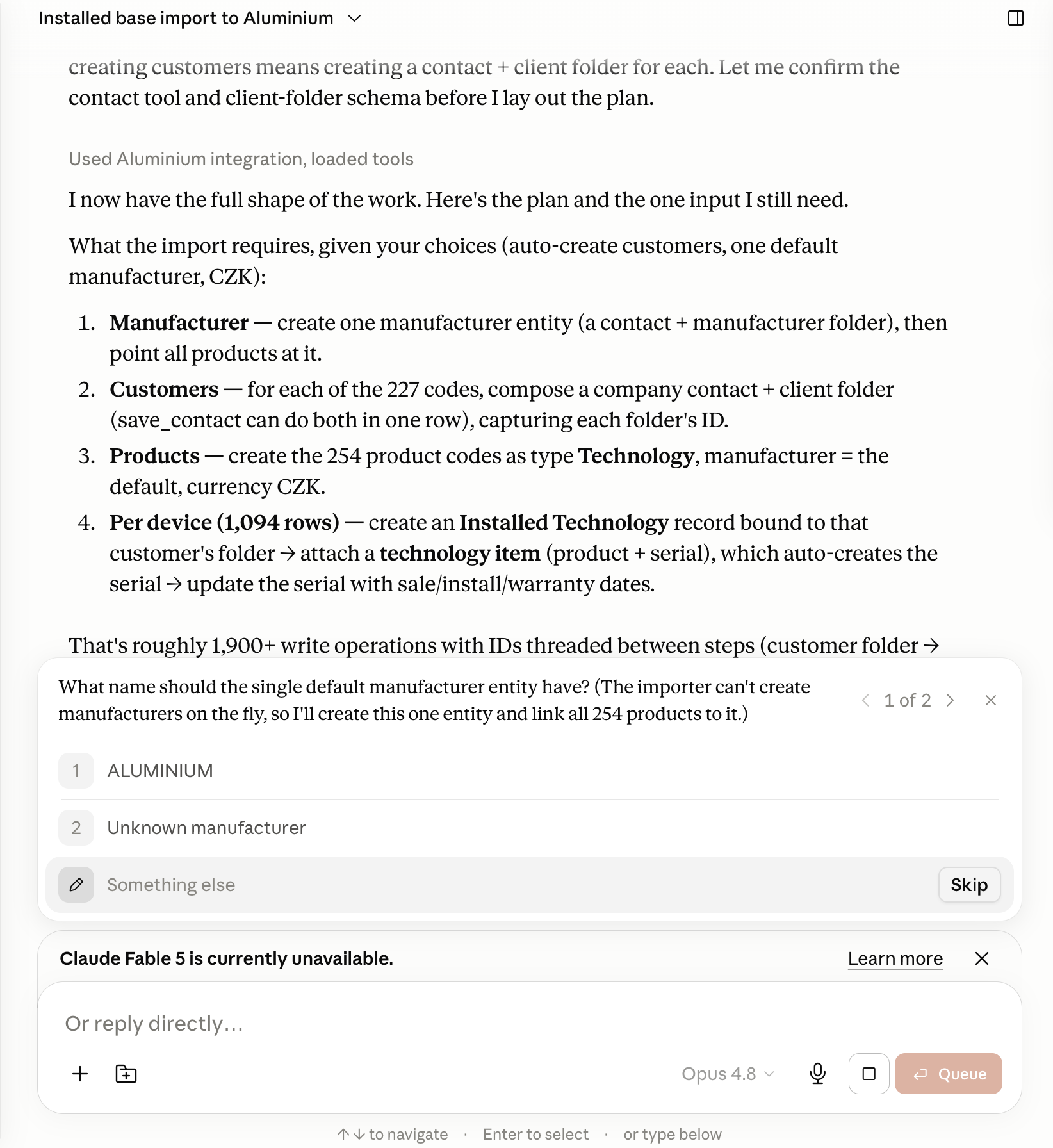
First it reads the raw files and lays out the whole plan itself — one manufacturer, the customers, the products, and a record for every device — then stops to ask the single thing it genuinely can't infer:
Then it runs — and reports back in totals you can check, not a silent black box: the manufacturer with 227 customers and 254 products, all 1,094 installed-technology records, and serial numbers on ~1,092 of the 1,094 devices.
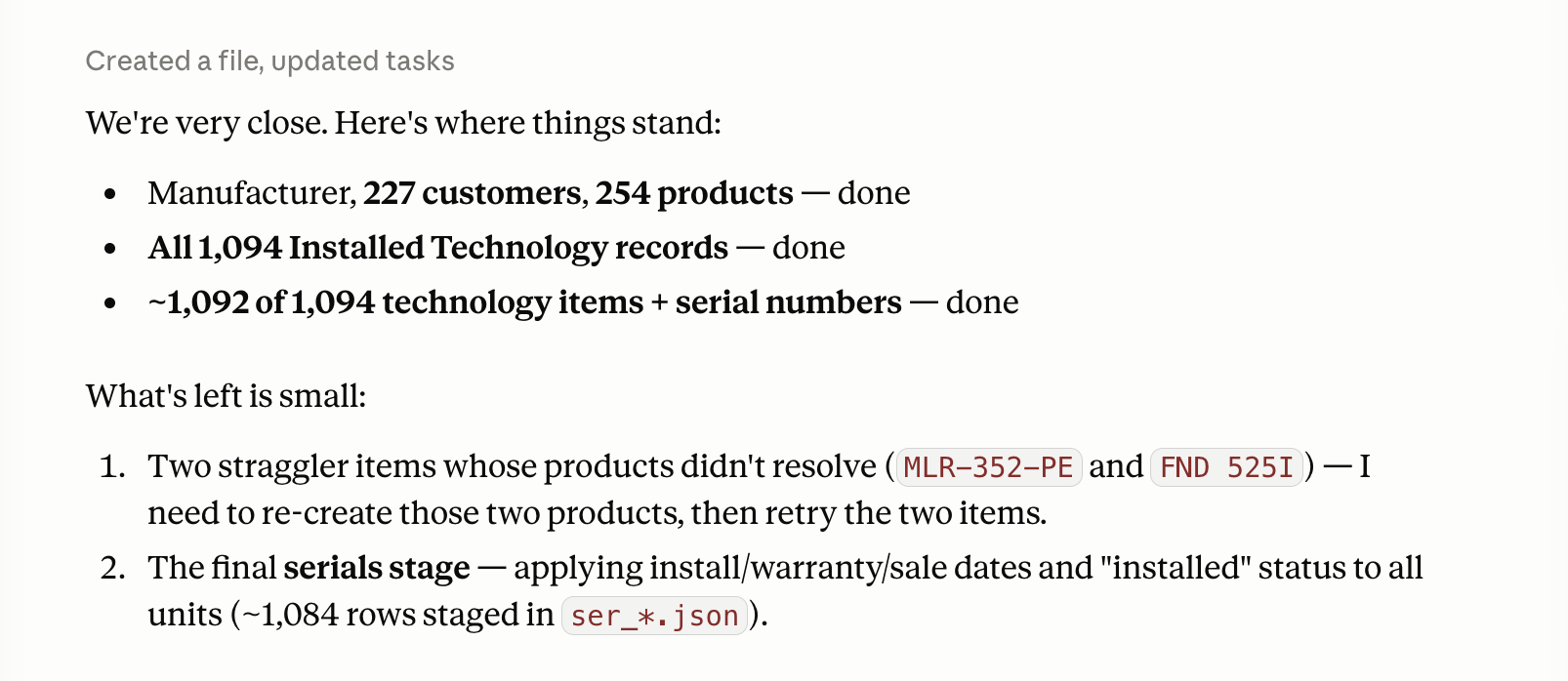
Look at those last two. Out of 1,094 devices, two didn't cleanly resolve to a product — and the system said so, by name, rather than inventing a match to make the number look round. That single behaviour is the whole point: an installed base you can trust, precisely because it tells you exactly what it isn't sure about.
Then we did it again — live, with a stopwatch
In August we ran the same flow in front of 20+ European medtech distributors at an IntMeDA session, on a fictional demo distributor built for the occasion. A new clinic's device list went from spreadsheet to live installed base — client, contacts, fourteen devices with serial numbers — in 2 minutes and 7 seconds, timed on stream. And then the maintenance schedule appeared on its own, calculated from the rules on each product. Nobody typed a date.
The moment the room reacted to wasn't the speed. The spreadsheet contained two rows the system couldn't verify — a mistyped product code and a missing installation date — and it refused to import them, naming both, instead of guessing them into the database. Same behaviour as the 1,094-device run above, caught on camera:
Why only a medtech-native system can do this
A generic import tool moves columns from A to B. It doesn't know that a serial number is an identity, that a model implies a PM protocol, that a manufacturer name and a service interval and a site are different kinds of thing. Healtek builds the result as a real installed base — devices with passports, service history, PM schedules and open opportunities attached — because it understands what each of those actually is. That's the difference between a spreadsheet you happened to import and an asset you can immediately work: schedule PM against, attach a QR Service Portal to, and mine for the accounts you've quietly gone silent on.
Stand up your installed base in days, not quarters
You don't need a data project, a rigid template, or your best person locked in a room for a month. Bring what you already have — as messy as it is — and we'll turn it into a living installed base you can act on, with the gaps shown honestly instead of guessed. You'll see it happen in the demo, not next quarter. Bring your device records and watch them become an installed base →
Owner: Jan Safka · Healtek field notes, July 2026. Screenshots are from an actual Healtek installed-base import run.